
Ugreen DXP2800 GT
If you buy through our links, we may get a commission. Read our ethics policy.
We’ve seen 10 gigabit adapters that cost more than the Ugreen DXP2800 GT network-attached storage peripheral. It’s not perfect for everybody, but it is an excellent blend of cost and features.
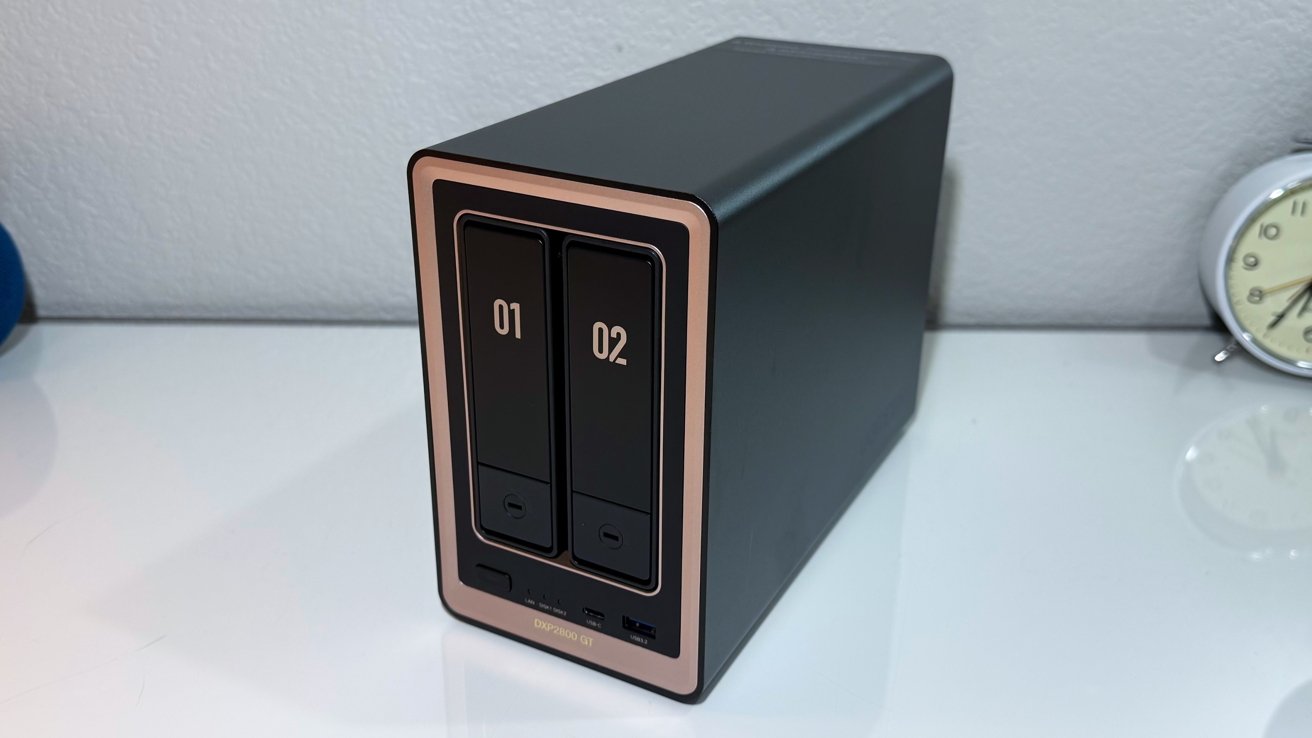
Most two-bay network drives are relatively quiet boxes in a corner or closet that hold onto your files. The Ugreen NASync DXP2800 GT has bigger goals than just that.
In a nutshell, it pairs a compact two-bay body with a genuine 10-gigabit network port. And it does it for about $500.
The catch is that two bays can only hold so much. This is a NAS with one clear job, rather than a do-everything home server.
| Product | Ugreen NASync DXP2800 GT |
| Price | $509.99 |
| CPU | AMD Ryzen Embedded R2514, 4-core / 8-thread, up to 3.7GHz |
| Memory | 8GB DDR4, expandable to 64GB, ECC supported |
| Drive bays | 2x SATA (also accept U.2 NVMe) |
| M.2 slots | 2x NVMe |
| Max raw capacity | 80TB (2x 32TB HDD plus 2x 8TB SSD) |
| RAID modes | JBOD, Basic, RAID 0, RAID 1 |
| Networking | 1x 10GbE RJ45 |
| Front ports | 1x USB-C (10Gb/s), 1x USB-A (10Gb/s) |
| Rear ports | 1x USB-A (10Gb/s), 2x USB-A (5Gb/s), 1x HDMI (4K) |
| Cooling | Single hydraulic fan, magnetic dust filter, 29-34 dB |
| Power use | 42.36W active, 18.12W hibernation |
| Operating system | UGOS (64GB eMMC system disk) |
| Dimensions (inches) | 9.13 x 4.31 x 7.02 |
Ugreen DXP2800 GT review: Hardware and build
For such a small NAS, the internals are surprisingly capable. At its heart sits an AMD Ryzen Embedded R2514, with four cores and eight threads.
That is far more processing power than a basic backup box strictly needs. It boosts to 3.7GHz, leaving plenty of headroom for several users working at once.
Ugreen DXP2800 GT review: Size compared to an M4 Mac mini.
Memory starts at 8GB of DDR4 and climbs all the way to 64GB. It even supports ECC, which is rare and welcome at this price, though the unit ships without it.
Cooling comes from a single hydraulic fan behind a magnetic dust filter. Ugreen rates it between 29 and 34 decibels, so it should stay quiet on a desk.
A 4K60 HDMI output rounds out the hardware. The unit is so compact, I considered packing it full of my media and bringing it with me to play back video on the hotel television.
That power brick held me back, and it would have been better had Ugreen gone with an approach similar to the Mac mini.
The system runs Ugreen’s UGOS from a separate 64GB drive, which keeps both bays free for your data. While it once wasn’t, UGOS Pro is easy to set up, easy to manage, and easy to control access.
The onboard software options are what you’d expect from a typical NAS. You have your private image album library system, your video storage and playback tools, and other productivity-centric items.
If you’re into downloading large files legitimately via Bittorrent, there’s a tool built in for just that, but you can install more with Docker if you want.
For our testing, we tested the unit with two 1TB Seagate Red drives provided by Ugreen. We also used two 24TB WD Red Pro drives, which retail for $1059 per drive on Amazon. Ouch.
SSDs used for testing included a pair of Samsung 990 Evo Plus drives, and a pair of Samsung SSD 9100 Pro 1TB drives. You don’t need to use drives this fast.
Stick with PCI-E 3.0 drives if you have them, as they’re cheaper and still provide more than enough speed.
Ugreen DXP2800 GT review: Storage and the two-bay question
There are two SATA bays, backed by two M.2 NVMe slots for solid-state drives. Fill everything, and Ugreen quotes a maximum of 80 terabytes. The bays will even take U.2 NVMe drives in place of ordinary SATA disks.
Ugreen DXP2800 GT review: A drive bay slot
The RAID options are basic, as the bay count demands. You get JBOD, Basic, RAID 0, and RAID 1, and nothing more elaborate.
That is really the heart of the matter. With only two bays, a mirror for safety leaves you the usable capacity of just one drive.
So this is not an incredibly future-proof box, and it never pretends to be. You cannot simply add more bays later when your library outgrows it, but you can snake USB cables to enclosed drives to expand, if you must.
Ugreen DXP2800 GT review: Front ports and indicators.
That makes its audience quite specific, which is not a bad thing. It suits a small office that needs dependable backup and shared file storage.
It also makes a tidy offsite backup, perhaps tucked away at a friend’s house, periodically mirroring your device at home. For either of those jobs, fast and simple beats endlessly expandable.
If you need it for backups, there’s support for Time Machine, though it’s not immediately usable.
We’re not going to get into the procedure here as always, but UGreen has a video about it. The support document is a bit better, though.
Ugreen DXP2800 GT review: The 10GbE advantage
The reason to choose this NAS over others in the class is the single 10-gigabit Ethernet port, which is genuinely unusual at this size and price. Most rivals in this class stop at 2.5-gigabit networking.
Ugreen DXP2800 GT review: Rear port selection
In practice, this is the difference between waiting and working. Large backups and video files move across the network far more quickly.
That is, of course, assuming you have the backbone to match. Most Wi-Fi 7 routers these days have at least one 10-gigabit port, so it may be best to hang off that.
The two spinning metal drives won’t saturate this connection. This is exactly where the two M.2 slots start to earn their keep.
Docker support is good to have, and also unusual on this class of NAS. The processor holds that back a hair, though.
Ugreen DXP2800 GT review: Processing performance
When it comes to processing performance, there are low expectations for such a simple NAS. To a point, benchmarks prove you can do better.
Ugreen DXP2800 GT review: Geekbench single-core scores
Geekbench 7 puts the single-core performance at a score of 965, which isn’t massive. An M1 Mac mini does much better at 2,192, with the M4 Mac mini soaring at 3,278 for the same benchmark.
It’s a similar story for multi-core performance. The 2,596 of the Ryzen chip isn’t great against the baseline Mac minis.
Ugreen DXP2800 GT review: Geekbench multi-core scores
The M1 Mac mini does over three times the performance of the NAS at 8,550. The 15,284 of the M4 Mac mini leaves the Ugreen device in the dust.
Obviously, if you want a server that can do a lot of high-performance processing, there are far better options available.
Let’s be clear. I’m talking about a device that is very much intended as a simple and essential storage device. But it also has things like an onboard surveillance system for your home’s cameras.
There’s also AI smarts too, including being able to recognize pets and handle semantic search queries.
Then there’s the ability to run a large number of different apps. There’s even Docker support here, which is really the only aspect of the device that’s hampered by the processor.
And this is all fine. This is not a $2,000 device on its own. Storage may push you past that price target, but that’s not Ugreen’s fault.
Ugreen DXP2800 GT review: Fast and focused
The DXP2800 GT was clearly designed to be a fast, compact NAS for backup and file sharing, and little else.
At a list price of $509.99 diskless, that 10GbE port is the clear star of the show. Very little else this small offers anything like the same network speed.
Ugreen DXP2800 GT review: There’s a magnetic rear fan cover.
The reasonably usable Ryzen chip and ECC support only sweeten the deal. This is serious hardware wrapped in a deliberately simple package.
Expansion can spread everywhere if you don’t get enough bays at the time of purchase. If you need real room to grow, a four-bay model is the wiser buy, rather than hanging external drives off the unit.
But if you want quick, dependable storage for a small team, this fits beautifully. As a main backup box or an offsite one, it does the job well.
Ugreen DXP2800 GT review: Pros
- Rare 10GbE networking at this size and price
- Capable Ryzen chip with ECC memory support
- Two M.2 slots on top of two SATA bays
Ugreen DXP2800 GT review: Cons
- Only two hard drive bays, so not future-proof
- Basic RAID options and limited redundancy
- 10GbE needs matching network gear to shine
Score: 4 out of 5
As I said before, the Ugreen DXP2800 GT is not the main expense here. The drives are, and that’s a shame.
Unlike competitors, Ugreen does not limit what drives you can install. It also has hardware video playback, allowing you to hook the relatively small box up next to your living room television and play video locally.
My personal jam is a Mac for a home server, paired with a six-bay NAS on-site, and a four-bay hosted remotely for backups. Fortunately, for most of my drives, I bought before the current stupid pricing on them, so I’ve got that going for me.
Just the same, this is not a $200 NAS for beginners, nor is it a $2,500 one with on-board massive power. It’s in between, and just right for most.
Look for units to fit edge cases elsewhere.
Where to buy the Ugreen DXP2800 GT
The Ugreen NASync DXP2800 GT is listed at $509.99, but there are generally discounts available.
Source: www.appleinsider.com
Source link